Design a Collaborative Document Editor like Google Docs | Google PM Interview
Technical Product Questions for System Design: Follow step by step guide on how to answer system design questions in a PM Interview
You’re sitting across from your interviewer at a top tech company. The behavioral questions went well. You nailed the product design question. Then they lean forward and ask:
“Design a collaborative document editor like Google Docs with real-time sync and conflict resolution.”
Your mind races:
“Real-time sync?
Conflict resolution?
Where do I even start?”
This moment separates candidates who can handle complex technical questions from those who can’t.
“Design Collaborative Document Editor” is one of the the most challenging system design questions in PM interviews. It tests multiple dimensions simultaneously:
✅ Real-time systems understanding
✅ Conflict resolution approach
✅ Product prioritization
✅ Scale considerations
✅ Technical-product balance
What you’ll learn in this guide:
Complete S.P.E.C.T.S. framework walkthrough for this specific question
Deep dive on conflict resolution (OT vs CRDTs)
How to prioritize features for collaborative editing MVP
Evolution path from simple to scaled architecture
By the end, you’ll have a systematic approach to answer not just “Design Google Docs” but any real-time collaboration system design question.
The Hidden Challenge: Conflict Resolution
Most candidates describe components and data flows but completely skip the hardest technical problem:
→ What happens when two users edit the same position simultaneously?
Consider this scenario:
Document contains: “The cat”
User A types “ sat” at position 7
User B types “big “ at position 4 (simultaneously)
What’s the final result? How do you ensure both users see the same thing?
→ If you don’t address this explicitly, you’ve missed the core technical challenge.
How to Answer System Design Questions?
Here’s a proven a repeatable framework that works perfectly well for system design questions and, in fact, for any technical question thrown at you.
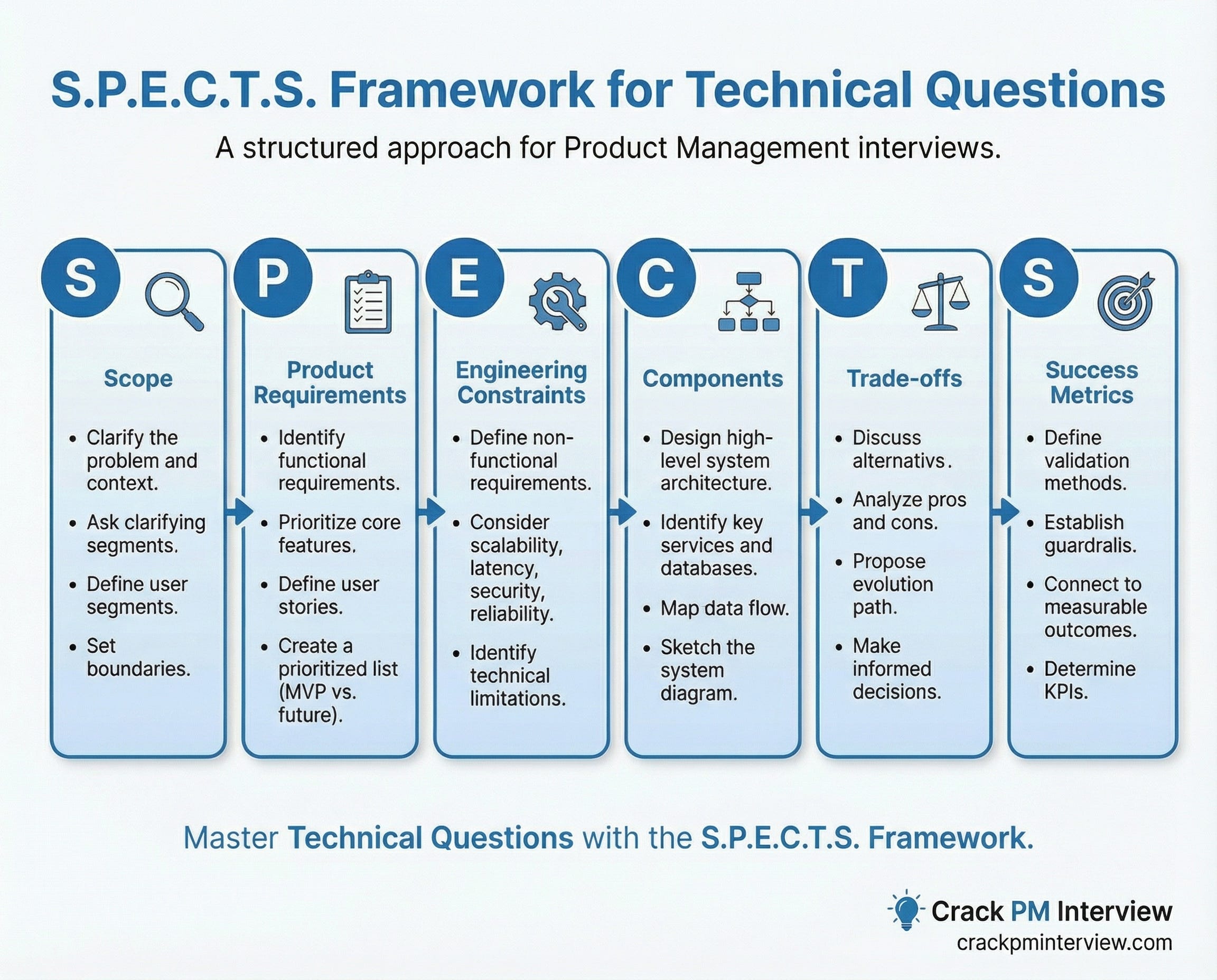
Use the below S.P.E.C.T.S. Framework:
S - Scope - Clarify the problem and context.
P - Product Requirements - Identify and prioritize functional requirements.
E - Engineering Constraints - Define non-functional requirements.
C - Components - Design high-level system architecture.
T - Trade-offs - Discuss alternatives and evolution path.
S - Success Metrics - Define validation, guardrails and connect everything to measurable outcomes.
Now, let’s dive in and answer this question.
Step 1: Scope - Clarify the Problem and Context
Goal: Ensure you’re solving the right problem before diving into solutions.
Start by asking clarifying questions:
Users & Scale:
“How many concurrent editors per document are we designing for? 2-10 or 100+?”
“What’s the total user base? Thousands or millions?”
“Who are the primary users? Students, professionals, enterprises?”
Platform & Geography:
“Web-only initially or mobile too?”
“Single region or global deployment?”
“What’s the typical document size?”
Feature Scope:
“Text editing only or rich media like images and tables?”
“Is real-time sync mandatory or can we do periodic sync?”
“Is offline editing required in MVP?”
“Version history needed initially?”
Timeline:
“Are we building an MVP in 3 months or enterprise-grade in 12 months?”
Interviewer’s likely response:
“Focus on web-first, real-time text editing for 2-10 concurrent users. Assume 100K total users, documents averaging 10K characters. Offline can come later. Real-time sync is mandatory. 6-month MVP timeline.”
Now restate the problem:
“So we’re building a web-based collaborative document editor that allows 2-10 users to edit text simultaneously with real-time synchronization. We’re optimizing for collaboration experience and reliability. We can defer offline mode, rich media, and mobile apps for post-MVP.”
State your assumptions explicitly:
✅ “I’m assuming modern browsers (Chrome, Firefox, Safari)”
✅ “Assuming reliable internet connectivity for real-time features”
✅ “Assuming we have existing authentication system”
✅ “Assuming cloud infrastructure is available (AWS/GCP)”
Define non-goals (critical for scoping):
❌ “We’re NOT building offline-first editing (complex sync, defer to later)”
❌ “NOT supporting rich media in MVP (images, videos, tables)”
❌ “NOT building mobile native apps initially (web-first)”
❌ “NOT building AI writing assistant”
❌ “NOT supporting 100+ concurrent editors per doc (edge case)”
Define success:
“Success means 2-10 users can simultaneously edit a text document with sub-100ms sync latency, zero data loss, and intuitive conflict resolution that requires no user intervention.”
Step 2: Product Requirements - Identify and Prioritize Functional Requirements
Goal: Identify core functionality and prioritize ruthlessly before thinking about implementation.
User Segments:
Primary:
Small team collaborators (2-5 people working on same doc)
Document owners (create, share, manage access)
Secondary:
Solo editors (writing without collaboration)
View-only participants (reading, no editing)
Edge Cases:
Commenters (can comment but not edit—defer)
Power users with large documents (50+ pages—monitor)
Core Use Cases:
Use Case 1: Real-Time Collaborative Editing
Multiple users edit same document simultaneously
Each user sees others’ changes within 100ms
Cursor positions visible for all editors
Changes merge automatically without conflicts
No data loss ever
Use Case 2: Document Sharing & Permissions
User creates document
Shares with specific users via email/link
Sets permissions (view/edit)
Recipients can immediately access and edit
Use Case 3: Solo Editing with Auto-Save
Single user writes without real-time collaboration
Document auto-saves every 30 seconds
Never loses work, even if browser crashes
Can close and reopen seamlessly
MVP vs Nice-to-Have Prioritization:
Why This Prioritization?
We’re focusing on nailing the core collaboration experience:
Real-time sync + conflict resolution are technically hardest—prove these work first
Basic formatting enables minimum viable editing without complexity
Presence (cursors) is critical for collaboration feel - users need to see others
Auto-save + permissions are table stakes - can’t launch without these
We’re deferring complexity:
Comments can layer on after solid foundation
Version history backend can be ready, UI comes later
Rich media adds massive scope—prove text editing first
Offline mode adds enormous sync complexity—wait until proven product-market fit
Trade-offs we’re making:
✅ Simple features done extremely well
✅ Fast time to market (validate hypothesis in 6 months)
✅ Focused on core technical challenge (real-time + conflicts)
❌ Not feature-complete vs Google Docs
❌ Limited formatting options initially
Step 3: Engineering Constraints - Define Non-Functional Requirements
Goal: Establish non-functional requirements that shape architectural decisions.
I) Scale Assumptions:
Users:
100,000 total registered users (MVP target)
10,000 daily active users
5,000 documents being edited at any moment
2-10 concurrent editors per document (typical)
Support up to 20 concurrent editors (edge case)
Documents:
Average document: 5-10 pages (~10,000 characters)
Maximum document: 50 pages (~50,000 characters)
50,000 total documents in system
Traffic:
Peak editing hours: 9am-5pm local time
Average typing speed: 2-5 characters per second
Per document with 5 editors: 10-25 characters/second
Growth: Plan for 10x user growth in 12 months
II) Latency Requirements:
Critical—User-Facing:
Character sync latency: <100ms (p95)
Why: Users perceive >100ms as noticeable lag
Impact: >100ms feels like “typing through mud”
This drives our architecture (WebSocket, not polling)
Cursor position sync: <150ms (p95)
Why: Slightly less critical than content
Impact: See where others are typing in real-time
Document open time: <2 seconds (p95)
Why: First impression of performance
Impact: Fast loading = good UX
Non-Critical:
Auto-save to server: <5 seconds (async)
Permission changes: <10 seconds (eventual consistency OK)
III) Availability Expectations:
Editing service: 99.9% uptime
Why: Users need access to documents 24/7
Tolerance: ~43 minutes downtime per month
Impact: Reliability is table stakes for enterprise
Graceful degradation strategy:
If real-time sync fails → Fall back to auto-save mode (30sec intervals)
If cursor sync fails → Hide cursor indicators, editing continues
If presence fails → Hide “who’s editing” list
User never loses ability to edit, just loses real-time features temporarily
IV) Data Consistency Requirements:
Strong Consistency Needed:
✅ Document content (can’t lose edits—ever)
✅ User permissions (security critical)
✅ Document ownership (access control)
Eventual Consistency Acceptable:
⏱️ Cursor positions (brief delay OK)
⏱️ “Last edited by” metadata
⏱️ Presence indicators (”User X is editing”)
Conflict Resolution Required:
Must use Operational Transformation or CRDTs
Guarantee: All users converge to identical final state
Zero data loss tolerance
No silent data loss—system must be deterministic
V) Security & Compliance:
Authentication & Authorization:
OAuth 2.0 for user authentication
JWT tokens for session management
Role-based access control (Owner, Editor, Viewer)
Data Protection:
TLS 1.3 encryption in transit
AES-256 encryption at rest
Document-level encryption keys
Compliance:
GDPR compliance (EU users)
Right to deletion (remove all user data on request)
Audit logs for document access
Data residency (store EU data in EU)
How These Constraints Shape Architecture:
Step 4: Components: Design High-Level Architecture
Goal: Map out major system components and how they interact without getting lost in implementation details.
The 7 Main Components:
I see seven main components organized into three layers:
Client Layer:
Web Application (React/Vue)
Collaborative Editing Engine
Application Layer:
WebSocket Gateway
Operational Transformation (OT) Service
Document Service
Presence Service
Data Layer:
Database (PostgreSQL) + Cache (Redis)
Explain the Simple Architecture Diagram verbally:
“Picture the system as three layers:
Top Layer Client:
User’s browser with rich text editor
Local editing engine that handles conflict resolution
Maintains local document state
Middle Layer Application:
WebSocket Gateway maintains persistent connections
OT Service transforms and broadcasts operations
Document Service handles persistence and permissions
Presence Service tracks cursors and who’s editing
Bottom Layer Data:
PostgreSQL stores documents, users, permissions
Redis caches active documents and sessions
Data flows from client → WebSocket → OT Service → Database, with responses flowing back the same path.”
Component Responsibilities:
1. Web Application (Client)
Render rich text editing interface
Capture user keystrokes instantly
Display document with formatting
Show other users’ cursors and selections
Optimistic updates (apply changes locally first, sync later)
Handle authentication UI
2. Collaborative Editing Engine (Client)
Implement OT algorithm on client side
Transform local operations before sending
Transform remote operations before applying
Maintain local document state
Queue operations when connection drops
This is the “secret sauce” of collaboration
3. WebSocket Gateway
Maintain persistent connections with all active clients
Route operations to correct document channels
Handle connection lifecycle (connect/disconnect/reconnect)
Load balance across gateway instances
Heartbeat for connection health
Why WebSocket: Full-duplex, low latency (<50ms), efficient for character-by-character updates
4. Operational Transformation (OT) Service
Receive operations from multiple clients
Transform operations to handle concurrent edits
Ensure all clients converge to same state
Broadcast transformed operations to all editors
This is where conflict resolution happens
5. Document Service
Persist documents to database
Handle auto-save from editing sessions
Manage permissions (who can view/edit)
Coordinate version snapshots
Handle document deletion
6. Presence Service
Track who’s viewing/editing each document
Broadcast cursor positions and selections
Handle user join/leave events
Separate from critical path (eventual consistency OK)
7. Database + Cache
PostgreSQL: Documents, users, permissions (ACID transactions)
Redis: Active documents, sessions, hot data (in-memory speed)
Key Data Flow: User Types a Character
Let me walk through what happens when User A types “H” at position 10:
Step 1 (0ms - Instant):
User A types “H”
Client immediately displays “H” locally (optimistic update)
User A sees “H” appear instantly - 0ms perceived latency
Step 2 (5ms):
Editing Engine creates operation object:
{ type: "insert", position: 10, char: "H", userId: "A" }
Sends via WebSocket to server
Step 3 (30-50ms):
WebSocket Gateway receives operation
Routes to OT Service for document
OT Service checks for concurrent operations
If User B also edited, transforms operations
Broadcasts to all other connected clients
Step 4 (50-100ms):
Other clients receive operation
Their Editing Engines apply it locally
All users see “H” appear at position 10
Total latency: 50-100ms (under our 100ms target)
Step 5 (Background - Non-Blocking):
Document Service buffers operations
Every 30 seconds: saves snapshot to PostgreSQL
User doesn’t wait for this
Result: User A sees instant feedback (0ms). Other users see change in 50-100ms. Everyone converges to same state. No data loss.
No Tech Stack Fixation:
What we’ve specified (appropriate for PM):
WebSocket for real-time communication (principle)
Relational database for structured data (principle)
Cache layer for performance (principle)
Client-side rendering (principle)
What we haven’t specified (leave to engineers):
Specific WebSocket library (Socket.io vs native)
Which relational DB (PostgreSQL vs MySQL vs...)
Which cache (Redis vs Memcached)
Programming language for backend
Specific frontend framework
If asked about tech stack choices: “I’d collaborate with engineering to choose technologies based on our existing stack, team expertise, and operational capabilities. The key architectural principles are WebSocket for low-latency bidirectional communication, a caching layer for performance, and a robust OT implementation for conflict resolution. These can be implemented with multiple technology stacks.”
Step 5: Trade-offs and Evolution - Show Technical Judgment
Goal: Demonstrate you understand multiple valid approaches, can evaluate them critically, and think about long-term evolution.
Critical Decision 1: Conflict Resolution Algorithm - OT vs CRDT
This is THE technical challenge for collaborative editing. When two users edit simultaneously, how do edits merge?
Two Options:
Option A: Operational Transformation (OT)
What it is:
Algorithm that transforms operations based on concurrent edits
Used by: Google Docs, Figma, Microsoft Office Online
Mature technology (20+ years, battle-tested)
How it works (simple example):
Initial: "The cat"
User A types " sat" at position 7 → "The cat sat"
User B types "big " at position 4 → "The big cat" (simultaneously)
OT transforms operations:
- A's operation stays: insert " sat" at 7
- B's operation stays: insert "big " at 4
- Both users see: "The big cat sat"
- Convergence guaranteed
Pros:
✅ Proven at massive scale (millions of users)
✅ Smaller message payloads (just the operation)
✅ Better performance for high-frequency edits
✅ More mature libraries (ShareDB, Ot.js)
✅ Lower memory overhead
✅ Industry standard - hiring easier
Cons:
❌ Complex to implement correctly (many edge cases)
❌ Harder to debug when issues occur
❌ Requires server coordination
❌ Challenging offline support
Option B: CRDTs (Conflict-free Replicated Data Types)
What it is:
Mathematical data structures that guarantee convergence
Used by: Notion, Linear, Automerge
Newer approach (last 10 years)
How it works:
Each character has unique ID with position metadata
Insertions add new IDs
Deletions mark as tombstones
All replicas eventually converge
Pros:
✅ Simpler mental model (eventual consistency)
✅ Natural fit for peer-to-peer/offline
✅ Easier to implement undo/redo
✅ No central server coordination needed
Cons:
❌ Larger message payloads (metadata overhead)
❌ Higher memory usage (tombstones)
❌ Less mature ecosystem
❌ Can degrade with large documents
Head-to-Head Comparison:
My Recommendation: Operational Transformation (OT)
For this MVP, I recommend OT.
Reasoning:
We’re web-first: Offline isn’t in MVP scope, so OT’s offline complexity doesn’t hurt us
Performance critical: Sub-100ms sync target. OT’s smaller payloads and faster processing help us hit this
Proven at scale: Google Docs uses OT with millions of users. We want battle-tested reliability
Better ecosystem: More libraries, documentation, and engineers familiar with OT
Team expertise: Easier hiring—more engineers know OT than CRDTs
Trade-offs we’re making:
✅ Trading implementation complexity for runtime performance
✅ Trading offline capability for proven reliability
✅ Trading theoretical elegance for practical maturity
❌ If offline becomes critical, migration to CRDTs is possible but costly
When we’d reconsider:
Offline editing becomes #1 user request
We pivot to mobile-first (poor connectivity markets)
CRDT libraries mature significantly
We move to peer-to-peer architecture (unlikely)
Critical Decision 2: Document Storage Strategy
How do we store and retrieve documents efficiently?
My Recommendation: Snapshot + Operation Log
Approach:
Store complete document snapshot every 5 minutes
Store individual operations (inserts/deletes) between snapshots
Reconstruct current state: Latest snapshot + subsequent operations
Storage pattern example:
Snapshot at 10:00am: "The quick brown fox"
Operations since:
10:01: insert " lazy" at position 20
10:02: delete "brown " at position 10
Current state = Snapshot + Operations
Why this approach:
✅ Fast document opens: Load recent snapshot (not all operations since creation)
✅ Complete history: All operations saved for debugging and version history
✅ Supports future features: Version history, time-travel debugging
✅ Industry standard: Google Docs uses similar approach
Trade-offs:
More storage space needed (snapshots + operations)
Need garbage collection for old operations
More complex than snapshot-only
Implementation details:
Snapshot every 5 minutes during active editing
Keep operations for 7 days
Garbage collect operations older than 7 days
Async background process—doesn’t block users
Alternatives considered:
Operation log only: Slow reconstruction, doesn’t scale
Snapshot only: No history, can’t debug conflicts
Why not these: Don’t support future version history, debugging
Evolution Path: MVP → Scale
Phase 1: MVP Architecture (Month 0-6)
Characteristics:
Single-region deployment (US-West or EU)
Monolithic OT service
Simple WebSocket server
Basic Redis caching
Manual failover if needed
Supports:
10,000 daily active users
5,000 active documents
2-5 concurrent editors per doc
<100ms latency (same region)
Optimized for:
Fast development (ship in 6 months)
Learning from users
Proving collaboration works
Validating OT implementation
Phase 2: Growth Architecture (Month 6-12)
New capabilities:
Multiple WebSocket servers with sticky sessions
Message queue for reliability
Separated Presence Service (offload from critical path)
Database replication (read replicas)
Redis cluster (distributed cache)
Auto-scaling for WebSocket layer
Supports:
100,000 daily active users
50,000 active documents
10+ concurrent editors per doc
Multi-AZ deployment for 99.9% uptime
Migration Triggers:
MVP → Growth: Trigger this migration when we hit -
50,000+ daily active users (server capacity)
WebSocket server hitting 80% CPU consistently
Database write throughput >1,000 writes/sec
User complaints about reliability/connection drops
p95 latency >150ms
Need for higher availability (enterprise customers)
Migration approach:
Add message queue first (can roll back easily)
Add database replicas (improves read performance)
Add second WebSocket server (test sticky sessions)
Gradually shift traffic (10% → 50% → 100%)
Separate Presence Service last (non-critical)
Rollback plan: Can roll back to MVP at each step—changes are additive
Step 6: Success Metrics: Define How to Measure Success
Goal: Connect everything back to measurable outcomes that validate technical decisions.
I) Primary Metrics:
1. Real-Time Sync Latency
Metric: p95 end-to-end latency from keystroke to remote client display
Target: <100ms
Why it matters:
Core user experience for collaboration
Users perceive >100ms as noticeable lag
Determines if collaboration “feels” real-time
How to measure:
Instrument client: timestamp when key pressed
Timestamp when remote operation received
Calculate delta, track p50/p95/p99
Business impact:
<100ms → smooth collaboration → high satisfaction → retention
150ms → feels laggy → poor experience → churn
Alert: p95 >150ms for 5 minutes → investigate
2. Conflict Resolution Success Rate
Metric: % of concurrent edits that merge correctly without data loss
Target: >99.99% (< 1 in 10,000 edits fail)
Why it matters:
This is the foundation—any data loss is catastrophic
User trust depends on reliable merging
Differentiates great collaborative editors from broken ones
How to measure:
Track total concurrent edit operations
Track operations requiring manual user intervention
Track any data loss events (should be ZERO)
Calculate success rate
Business impact:
99.99% success = trust = enterprise adoption = revenue
Any data loss = viral negative reviews = product death
Alert: Any data loss → immediate page to engineering
3. Document Save Success Rate
Metric: % of documents successfully saved without data loss
Target: 100% (zero tolerance)
Why it matters:
Data loss is unacceptable
Reputation-destroying if users lose work
Legal implications (especially for enterprises)
How to measure:
Track all save operations (auto-save + manual)
Track save failures
Track data integrity checks (hash validation)
Business impact:
100% saves = trust = paid conversions
Any data loss = negative reviews = death spiral
Alert: Any save failure → immediate investigation
4. System Availability (Uptime)
Metric: % of time editing service is available
Target: 99.9% (43 minutes downtime per month)
Why it matters:
Users need 24/7 access to documents
Enterprise SLAs require high availability
Downtime = lost productivity for users
How to measure:
Health check endpoint every 10 seconds
Track successful vs failed checks
Exclude planned maintenance windows
Business impact:
99.9% = meets enterprise requirements = B2B sales
<99% = fails enterprise SLAs = lose deals
Alert: <99.5% in 24-hour window → escalate
II) Secondary Metrics:
1. Collaboration Session Duration
Target: >15 minutes average
Why: Indicates engagement with collaboration
Insight: Rising = users finding value
2. Concurrent Editors per Document
Target: Average 2-3, handle up to 20
Why: Validates use cases and tests scale
Insight: Higher numbers = need to scale infrastructure
3. Time to Open Document
Target: <2 seconds (p95)
Why: First impression of performance
Insight: Slow opens = investigate caching
Guardrail Metrics:
1. Error Rate: <0.5% across all operations (alert: >1%)
2. WebSocket Connection Drops: <2% unexpected disconnects (alert: >5%)
3. Database Query Latency: <50ms reads, <100ms writes (alert: >200ms)
4. Cost per Active User: <$0.50/month (review if >$1)
How Metrics Tie to Outcomes:
Summary: Tying It All Together
Let me summarize the complete solution:
What we’re building: A web-based collaborative document editor for 2-10 simultaneous users that enables real-time, conflict-free editing with sub-100ms sync latency.
The MVP includes:
✅ Real-time text editing with Operational Transformation
✅ Cursor presence (see where others are typing)
✅ Basic text formatting (bold, italic, font sizes)
✅ Automatic conflict resolution (no user intervention)
✅ Document sharing with permissions (view/edit)
✅ Auto-save every 30 seconds
We’re deferring (post-MVP):
❌ Rich media (images, tables)
❌ Offline editing
❌ Comments and suggestions mode
❌ Version history UI (backend ready)
❌ Mobile native apps
Technical approach:
We’re using client-server architecture with WebSocket communication:
Client: Web app with local OT engine for instant updates
Server: WebSocket Gateway → OT Service → Document Service
Data: PostgreSQL for persistence + Redis for caching
This architecture handles 10K daily active users, 5K active documents, 2-10 concurrent editors per doc, with <100ms latency and 99.9% uptime.
Key trade-off: OT vs CRDTs
We chose Operational Transformation because:
Proven at scale (Google Docs uses it)
Better performance for our <100ms latency target
We’re web-first (offline not in scope)
More mature libraries and ecosystem
We’re trading implementation complexity for runtime performance and proven reliability.
Reconsider if: Offline becomes #1 user request or we pivot mobile-first.
Evolution path:
MVP (0-6 months): Simple, single-region → Proves collaboration works
Growth (6-12 months): Multi-server, message queue, replicas → Scales to 100K users
Migration trigger: 50K daily active users or latency >150ms
Success measured by:
<100ms sync latency (smooth UX → retention)
99.99% conflict resolution success (trust → adoption)
100% save success (zero data loss → organic growth)
99.9% availability (reliability → enterprise sales)
Infographic summary for designing real-time collaborative systems:
This is how a senior PM summarizes to leadership: Starting with user value, explaining technical approach, making explicit trade-offs, showing evolution, and connecting everything to business outcomes.
Want more system design deep-dives?
We will be creating detailed walkthroughs of the most popular PM interview questions:
Design Instagram’s News Feed
Design Uber’s Matching System
Design Netflix’s Recommendation Engine
Design a URL Shortener
And more...
Subscribe to get them delivered to your inbox.


Outstanding walkthrough of the OT implementation decision! The OT vs CRDT comparison crystalizes a trade-off most PM candidates gloss over or dont even realize exists. I've used ShareDB in production and the hidden complexity isn't the algorithm itself but debugging edge cases when things break. The SPECTS framwork keeps the anwer structured without feeling robotic, which is rare in system design guides.