A year ago this would have been a curveball. Now Google, xAI, Meta and OpenAI have announced personal agents, and interviewers have a practical reason to ask you to design one: the same product decisions are being debated inside their companies.
This question is harder than “design a chatbot” because an agent acts. It sends the email, books the table and pays the bill. When a chatbot is wrong, you get a bad paragraph. When an agent is wrong, a message goes to the wrong person, money leaves your account or a commitment gets made in your name.
The lesson from reported early Instinct incidents is straightforward: one unauthorized action can destroy trust. Keep that in mind throughout your answer.
The interviewer wants to see:
Can you pick a problem where an agent creates real value, instead of a capability looking for a use?
Do you understand what agents can reliably do, and where they still break?
Can you decide how much the agent should do on its own, task by task?
Do you treat privacy, security and misuse as design requirements?
In this post, I’ll work through the whole answer using an adapted CIRCLES framework for AI product design questions, from clarifying questions to rollout, and finish with a short spoken summary you can practice.
You don’t need to memorize product specs for this interview. But knowing what has been announced gives you two advantages: your ideas sound grounded, and you can connect design choices to real failures.
Treat the following as a snapshot of public announcements and reporting, not a benchmark proving that every advertised capability works reliably.
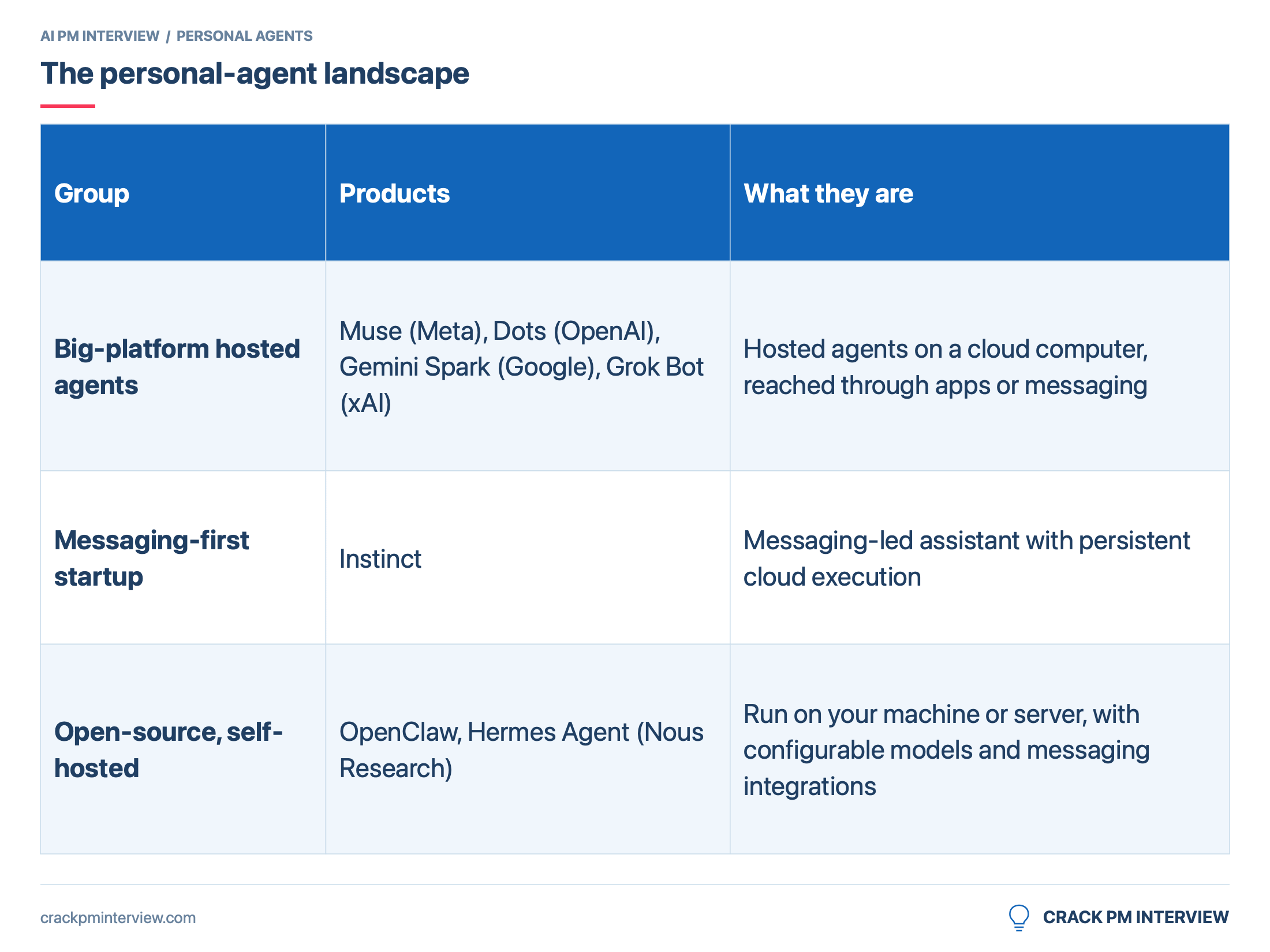
Dots:OpenAI’s September 29 announcement describes a primary Dot working on a cloud computer, approval rules and read-only access for background research. The design lesson is to separate gathering information from taking action.
Gemini Spark:Google’s I/O announcement pairs an always-on agent with proactive Daily Briefs. The opportunity is not just answering a request, but noticing work that needs attention.
Grok Bot:xAI’s launch announcement describes always-on AI teammates. Its current documentation says Bots share a computer, so don’t assume that every named specialist automatically has an isolated environment.
Instinct:Early reporting raised concerns about consent, retained email and prompt injection. Treat those as reported incidents, not proof that every session behaves the same way. The useful product lesson is to make authorization and deletion observable, rather than relying on a conversational promise.
OpenClaw: Its readable memory files and community skills support user control and extensibility. Its own ClawHub security analysis discusses malicious skills; VirusTotal scanning adds a layer of defense, not a guarantee of safety.
Hermes Agent: The Nous Research project builds reusable skills from experience and manages persistent memory. The lesson is that learning can be useful, but new routines and remembered facts still need boundaries.
Now step back and look at the pattern, because this is the insight that sets your answer apart.
These products agree on capability and disagree on control. Almost all of them combine a computer that keeps running when you close the app, messaging as the front door, proactive check-ins, long-term memory and some form of reusable skills. Where they split is:
Who decides when the agent acts alone. Explicit rules (Muse, Dots), learned judgment (Grok Bot), or in Instinct’s reported case, sometimes nobody.
Where the agent and your data live. Hosted is convenient but needs trust in the company. Self-hosted gives control but hands the security work to users.
One agent or a team. Muse and Instinct are one agent. Grok Bot ships teams. Dots promises them.
Where new abilities come from. Taught by demonstration, written by the agent itself, or downloaded from a marketplace. Each one opens a different door to attackers.
Capability is close to a commodity now. The control questions are you need to spend time on.
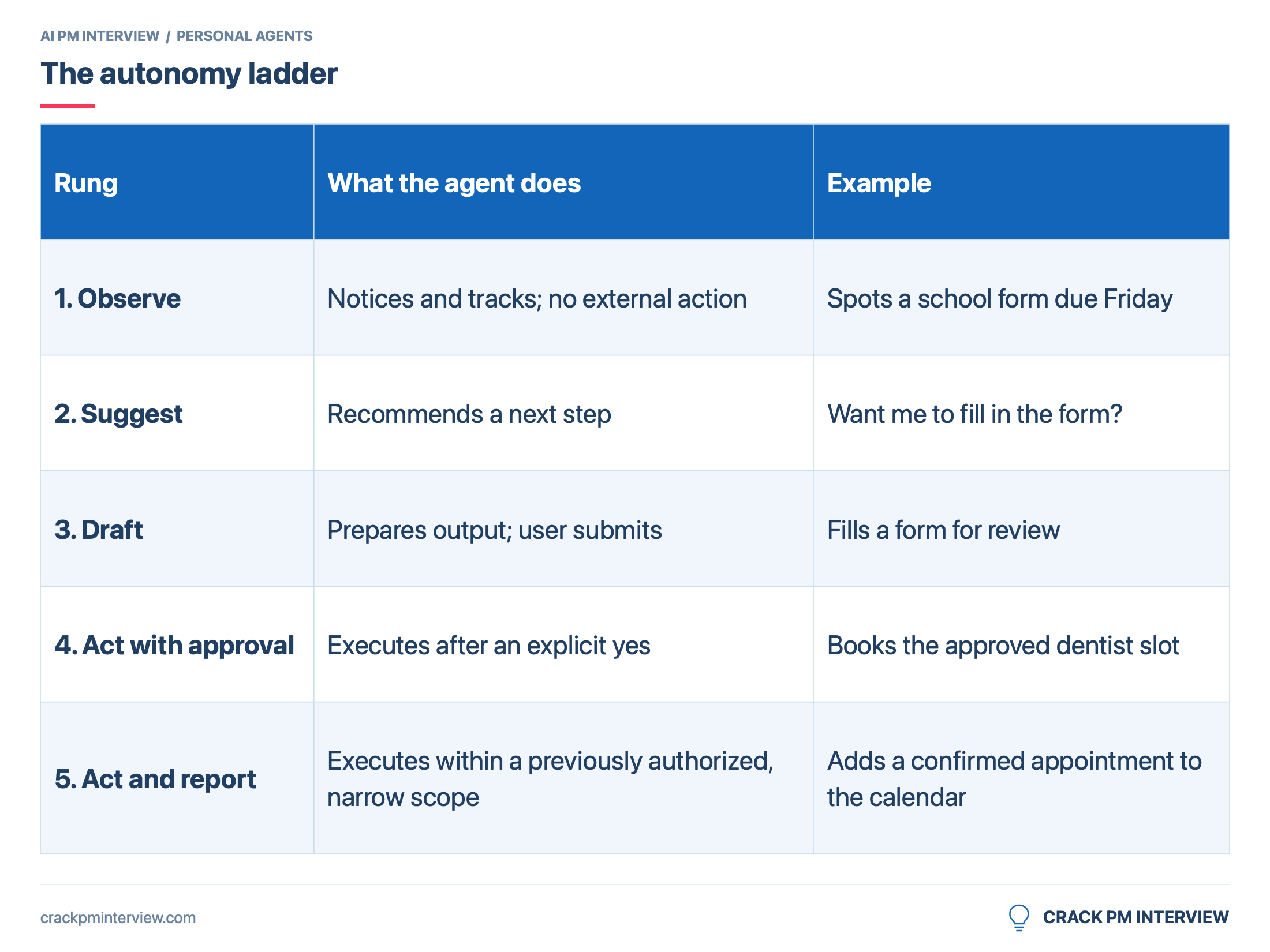
The autonomy ladder of personal AI agents
There's one tool you'll use throughout this answer. Draw it on the whiteboard early.
The rule is simple. The more costly and less reversible an action, the lower the rung.
Before you design an agent, you need to know whose agent it is, what it can touch and what success looks like. "Personal AI agent" could mean a developer tool, an enterprise assistant or a consumer app, and those are three different products.
The clarifying questions I’d ask
1. Company and existing surfaces
Q: "Are we designing this for a specific company, and does it already have products the agent could live inside, like a messaging app, an operating system or a productivity suite?"
Why this matters: Distribution decides a lot. Meta put Muse inside WhatsApp, OpenAI put Dots inside ChatGPT, and Google tied Spark to Gmail. An agent with no home has to win users from scratch.
2. Consumer or work
Q: “Should I focus on people’s personal lives, their work, or both?”
Why this matters: Work agents get IT admins, single sign-on and company data policies. Consumer agents get messy family logistics, personal email and no admin to clean up mistakes. The risks and the buyers are different.
3. Access and authority
Q: “What can the agent touch? Only read email and calendar, or also send messages, make bookings and spend money?”
Why this matters: This is the most important question in the interview. Read-only agents are summarizers with good timing. Agents that can send and pay are a different category of risk, with different legal exposure.
4. Business goal
Q: “What’s the main goal? Engagement with our existing apps, a new subscription line, or making our platform harder to leave?”
Why this matters: An engagement goal pushes toward a chatty, proactive agent. A subscription goal pushes toward measurable time saved, because people only pay for outcomes.
5. Platform (Interaction surface)
Q: “Where do people interact with it: a standalone app, inside messaging, by voice, or on wearables?”
Why this matters: Approval flows look very different in a chat bubble versus a phone app versus smart glasses.
6. Constraints
Q: “Any constraints I should design around, like privacy regulation, liability for actions taken on the user’s behalf, or compute budget?”
Why this matters: A personal agent runs a cloud computer per user and touches the most sensitive data people have. Cost and liability can kill a product that users love.
Example response
Interviewer:"Good questions. Assume you're a PM at a large consumer tech company with a popular messaging app. Focus on consumers. The agent can connect to email, calendar, messages and payments, but you decide how much autonomy it gets. The goal is weekly active delegation, meaning people actually hand it tasks every week, and longer term a paid tier. Launch in the US. Privacy is non-negotiable."
Summarize the personal agent contextcontext
Before moving on, I'd summarize what we know out loud.
What’s already been solved, more or less:
Agents that keep working after you close the app, on their own cloud computer (Muse, Dots, Spark, Grok Bot, Instinct)
Reaching the agent through messaging you already use
Connecting to email, calendar and common services
What hasn’t:
Reliability on long tasks. A task with 15 steps fails if any one step fails, and websites throw up CAPTCHAs and two-factor prompts that stop agents cold
Trust. Users don’t yet know when to let an agent act alone, and the early incidents made them more careful
Cost. Most launches sit behind $100 to $300 a month tiers or invite lists, with Muse’s free tier as the main exception, because a computer per user is expensive
Who's being served: Dots and Grok Bot lean toward work. OpenClaw and Hermes serve developers who can run their own servers. Muse and Instinct are the only major agent clearly aimed at everyday households. That's a gap worth noticing.
💡 Interview Tip: For agent questions, clarify permissions and liability before goals. The interviewer may never have thought about "who's responsible when the agent signs something," and raising it early makes you sound like someone who's shipped risky products.
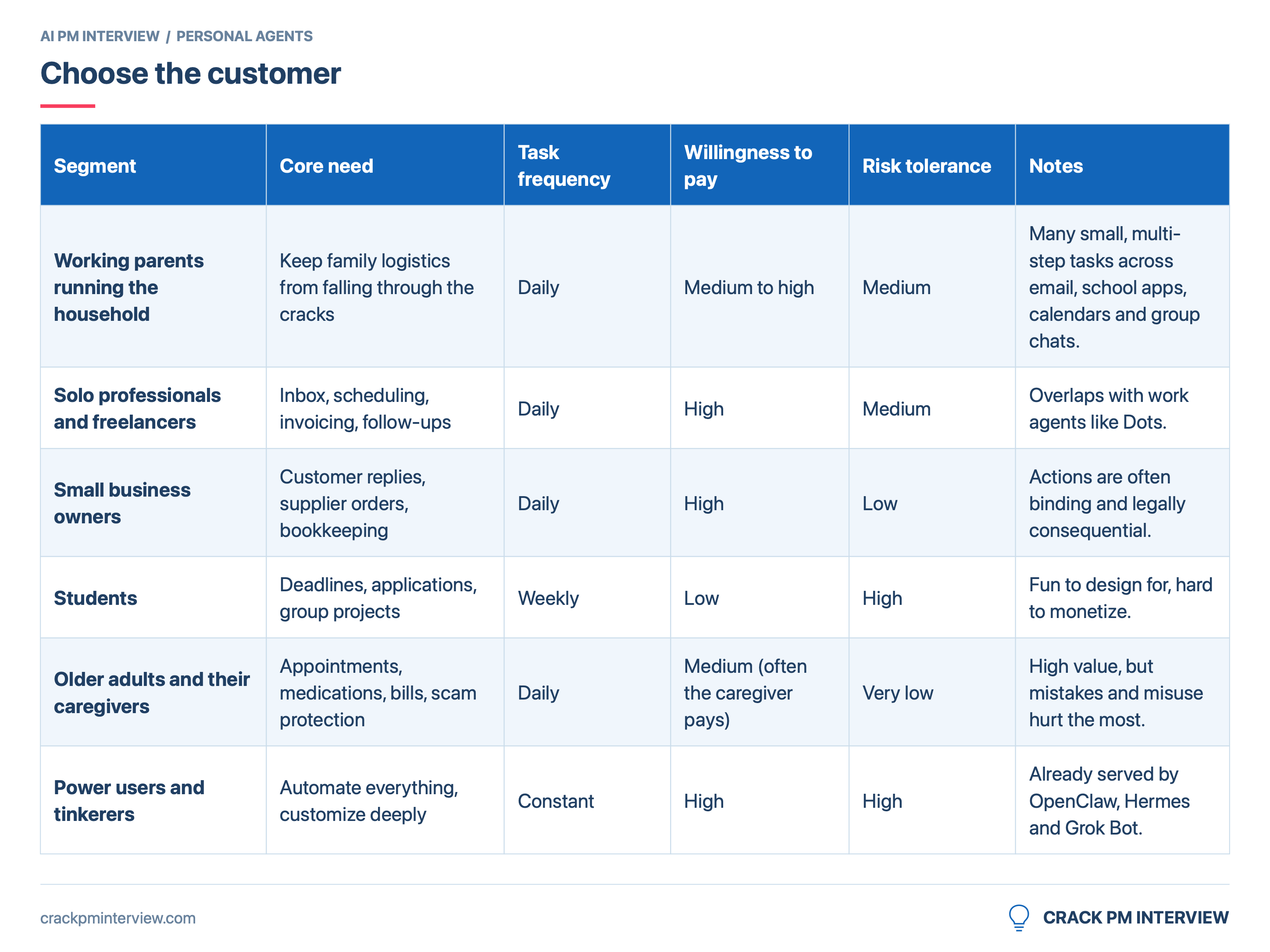
A personal agent could serve almost anyone. That is why you need to choose.
Choosing the Primary Segment
I’ll focus on working parents who run the households.
Here’s my reasoning:
Problem intensity is high: Household admin is a second job. School forms, doctor appointments, birthday parties, renewals, bills, and the endless back-and-forth to coordinate two working adults and their kids.
Daily frequency supports the goal: That's what builds the weekly habit our goal depends on.
The work is right for an agent: It's many small tasks, each spanning several apps and people and days, which is exactly where an agent beats a chatbot or a to-do list.
There is a safer starting point: Capturing tasks, preparing drafts and adding confirmed appointments are easier to constrain than payments or binding purchases.
It fits our distribution: Families already coordinate in the messaging surface we own. We can meet them where the request appears.
The market is open: Work agents and developer agents aren’t built for this person, and Muse/Instinct are the only direct competitor.
Why not power users first?
They're tempting because they'll try anything and give great feedback. But they're already served, they'd push us toward autonomy too early, and designing for them leads to a settings-heavy product that mainstream users won't touch.
Why not older adults first?
The value is real, but so is the downside. Scam exposure, cognitive decline and shared financial control make it a harder first launch. I'd come back to them once our safeguards are proven, with the caregiver in the loop.
Working Parent User Persona:
has two school-age children and a full-time job.
They coordinate the family calendar and most incoming requests.
Assume they spend an evening a week on administration.
Their biggest worry is the task they did not notice.